Welcome to your new TradeFundrr Options account!
When getting started, please use the credentials that we have sent to your email to log in to your TradeFundrr dashboard. The link to your dashboard can be found HERE.
First, you must sign your funded agreement. On your dashboard, you will see an icon indicating that you need to sign the funded agreement as shown here (right-click on the image to enlarge it in a new tab):
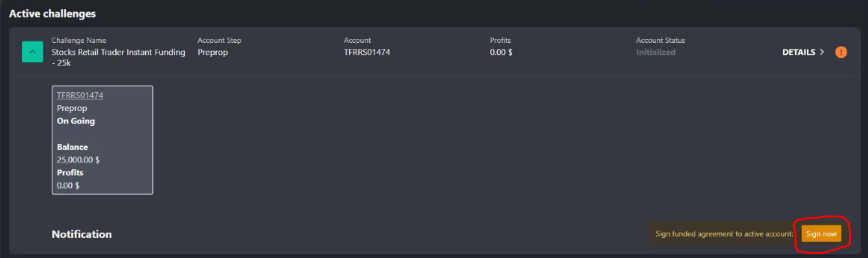
After signing the funded agreement, you will be redirected back to the dashboard and will see a new prompt to sign the data feed agreement. This must also be completed to receive live data:
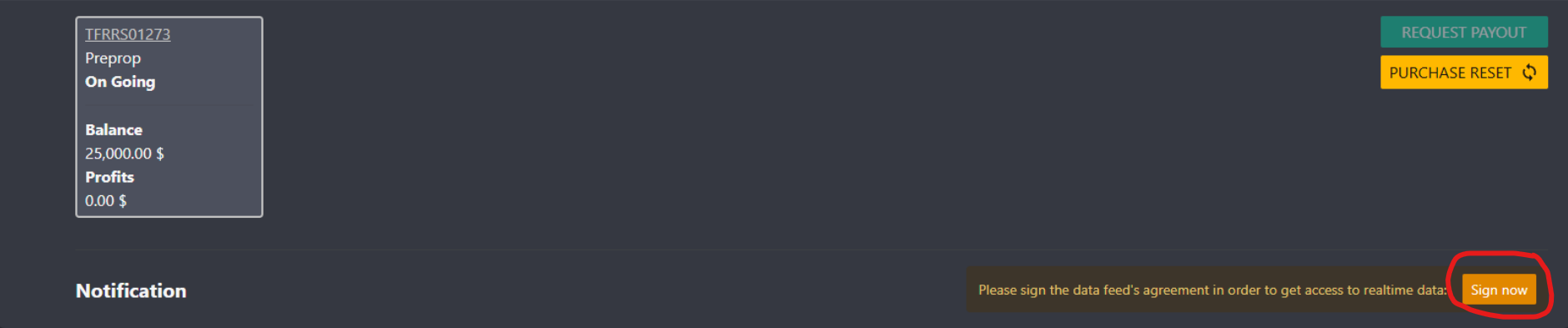
DX Feed Data Agreement:
You will be redirected to the DX Feed page and you simply need to sign the data agreement and you can move on to the next step.
This is the end of this step. Please go to Step 2.
Was this article helpful?
That’s Great!
Thank you for your feedback
Sorry! We couldn't be helpful
Thank you for your feedback
Feedback sent
We appreciate your effort and will try to fix the article